.png?width=260&height=84&name=WORLDVIA%20TQN%20COMBO%20LOGO%20(1).png "WorldVia Travel Network Logo")
.png?width=155&height=50&name=WORLDVIA%20TQN%20COMBO%20LOGO%20(1).png "World Via Travel Network")
AI Tip: Triage Your Inbox and Calendar in One Prompt

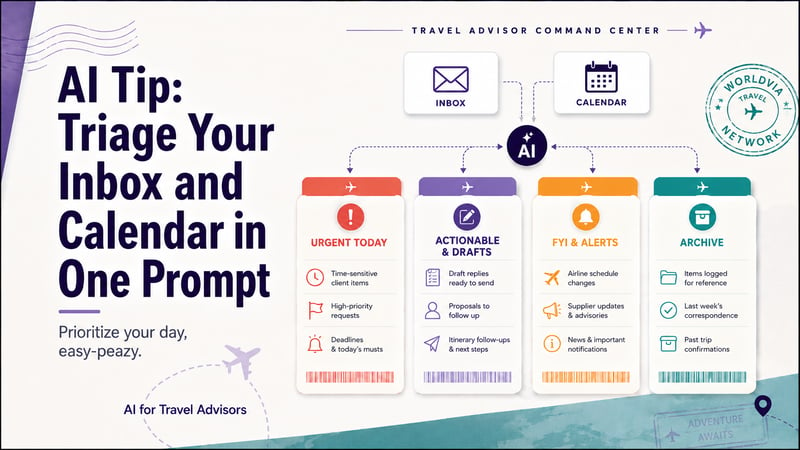
Prioritize your day, easy-peazy.
Complexity Level: ✈️ ✈️ ✈️ (2 mins per day, 10 min initial setup)
Forty unread emails, three consults on the calendar, and a deposit due by 5 p.m. that nobody flagged. Sorting that out usually eats the first hour of your day. Here is a prompt that does that hour for you: you hand your AI assistant your mailbox and your calendar, and it hands back a sorted digest with the replies already drafted.
The Setup
Paste this into ChatGPT, Claude, or Gemini once you have connected your mailbox:
Act as my executive assistant. Access my unread Gmail messages [or swap in your email provider, eg. 'unread Outlook emails'] from the last 24 hours and today's calendar events.
Analyze everything and build a unified daily digest with these 4 sections. Group by priority, not by source — if a client's question, a supplier's reply, and a payment deadline all belong to the same trip, combine them into one item.
🔥 URGENT TODAY: Critical items with a hard deadline — final payments and deposits due, option or hold expirations, waiver and schedule-change windows, a client decision I owe today, or a trip departing in the next 72 hours with an open item. Show me the exact deadline and the specific action I need to take.
📥 ACTIONABLE & DRAFTS: Important items to handle today — client questions, quote requests, and supplier follow-ups that need a reply. For each one, write a ready-to-send draft under 4 sentences in a warm, professional tone. Put a [bracketed placeholder] anywhere you'd be guessing at a fact like a price, a confirmation number, or availability. Do not guess. Use [placeholders] when you don't have the information.
📰 FYI & ALERTS: Updates I should know but don't need to act on — supplier promotions, commission-rate or policy changes, air schedule-change and waiver notices, host-agency announcements, and threads that moved since yesterday. One punchy bullet each.
🗑️ RECOMMEND FOR ARCHIVE: Low-priority items I can bulk-clear — marketing blasts, generic newsletters, and automated notifications. List them together so I can archive in one pass.
You get back four buckets: what has a hard deadline today, what needs a reply with a draft already written, what is worth knowing but not acting on, and what you can clear in one pass.
Read each draft, fill any [bracketed placeholder] where the AI would otherwise guess at a price or a confirmation number, and send.
One requirement: a paid tier of ChatGPT, Claude, or Gemini with a mailbox connector turned on, the piece that lets the assistant read your Gmail or Outlook. The free tiers cannot reach your inbox. Gemini is the easy pick if you already work in Google Workspace, since it reads Gmail and Calendar out of the box.
How to connect your inbox: There are loads of great guides and youtube videos on the internet for each ai and email provider. Just google "How do I connect my [gmail or outlook] to [chatGPT, claude or gemini]?" or just ask the ai tool you're using and it will walk you through it.
Try this today
Connect your mailbox, run the prompt on this morning's inbox, and see what it surfaces that you would have tripped over for an hour.
– Keep building with AI,
Jason
Leave a comment below, or subscribe to get AI Tips for Travel Advisors straight to your inbox.







.png?width=500&height=500&name=Untitled%20design%20(28).png)