.png?width=260&height=84&name=WORLDVIA%20TQN%20COMBO%20LOGO%20(1).png "WorldVia Travel Network Logo")
.png?width=155&height=50&name=WORLDVIA%20TQN%20COMBO%20LOGO%20(1).png "World Via Travel Network")
AI Tip: Teach AI Your Way of Working Once with "Skills"

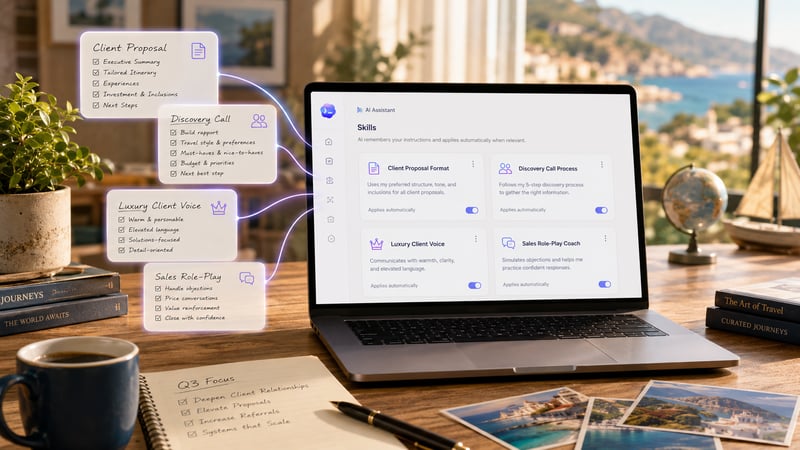
The feature that turns a one-time explanation into a teammate who never forgets.
Complexity Level: ✈️ (this one is just "get the idea." No setup required today.)
Many of you have already shared the Daily AI Tip for Travel Advisors with others (thank you!), but if you know anyone that wants to learn how to use Skills, forward this to them and tell them to signup because today we're unpacking what Skills are and tomorrow we're going to build one together.
Think about a recipe for a second. A good one captures everything that matters: the ingredients, the steps, the order, the little "don't skip this" notes that make it work. Once it's written down, anyone can follow it and get the same result. The best part, the creator doesn't have to stand at the stove re-explaining every step from memory.
Meet Skills.
You probably already have many "recipes" in your business: the way you structure a client proposal, the questions you ask on a first call, your tone in a follow-up email. Right now, every time you open a new AI chat, you're cooking from memory: re-explaining the steps (or hoping the AI's memory actually remembers), re-pasting the format, hoping it comes out the same as last time. A Skill writes that recipe down once so the AI can follow it on its own.
So what actually is a Skill?
A Skill is a saved set of instructions plus any templates or reference files it needs. You write it once. From then on, the AI recognizes when a request matches that recipe and follows it automatically. You don't have to summon it or paste anything; the right recipe just comes off the shelf when the task calls for it.
You may have actually used the idea already without knowing it. When you ask an AI to build a spreadsheet or polish a Word doc, it's leaning on built-in Skills for Excel, Word, PowerPoint, and PDFs. The new opportunity is building your own.
Why a travel advisor would want Skills
- Stop repeating yourself. Your client-intake process, your proposal format, your "voice" — captured once, reused forever.
- Consistency. The tenth proposal sounds as sharp as the first, even at 11 p.m. on a Friday.
- It's your expertise, packaged. The way you qualify a luxury client or structure a group quote is worth something. A Skill turns that know-how into something you can run on demand.
Those are just a few examples, but the possibilities are endless. Once you create a few, I don't think you'll be able to stop. I have almost 100 different skills that I've created for a wide variety of uses. I think you will too once you discover how easy and amazing they are.
How you use a Skill
The built-in Skills are already working in the background on Claude and ChatGPT. To make your own, you don't need to write code. The honest shortcut: describe what you want in plain English, and the AI will help you build the Skill itself, step by step. You teach it the way you'd teach a person, and it writes down the instructions for you.
That's the part we're going hands-on with tomorrow.
Coming tomorrow
In tomorrow's tip, we're writing our first recipe (Skill) together: a Sales Role-Playing and Coaching Bot. It's a Skill that plays the part of a hesitant or difficult or distracted or you-name-the-type client (the price-shopper, the over-researcher, and on and on). You'll be able to practice your discovery questions and your close in a safe spacee, then get coached on what to tighten. If you've ever wished you could rehearse a tough sales call without burning a real lead or getting embarrased by practicing in front of another human, this is the one to watch for.
And here's the best part: you won't need to know a single technical thing to write it. We'll write the "ingredients" in plain English, and the AI will do the rest.
– Keep building with AI,
Jason
Leave a comment below, or click subscribe to get daily AI Tips for Travel Advisors straight to your inbox.
.png?width=400&height=500&name=Jasons%20Weekly%20Message%20Images%20(19).png)

.png?width=400&height=500&name=Untitled%20design%20(16).png)
.png?width=400&height=500&name=Jasons%20Weekly%20Message%20Images%20(25).png)

.png?width=500&height=500&name=Untitled%20design%20(28).png)